What Is A Car Head Up Display: How It Works
A car head-up display projects key driving data into your view, helping you stay informed without looking down.
Understanding what is a car head up display can make modern vehicle technology much less confusing. This guide explains how HUD systems work, what they show, their safety benefits, their limits, and how to choose one that fits your driving needs.
What Is a Car Head-Up Display?
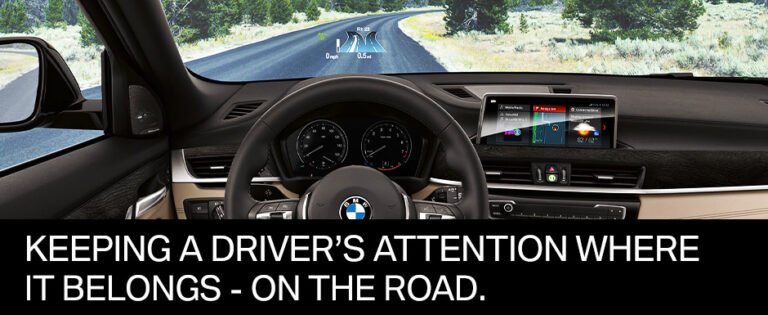
A car head-up display, often called a HUD, is a system that shows driving information near the driver’s normal line of sight. It may display speed, navigation directions, traffic signs, safety alerts, and other data.
Instead of looking down at the instrument cluster or center screen, you can see important details on the windshield or a small clear screen above the dashboard. The idea is simple: keep your eyes closer to the road.
So, what is a car head up display in practical terms? It is like having a small digital dashboard floating in front of you. The display does not replace the vehicle’s main screens, but it reduces the need to look away from traffic.
Most factory systems use a projector inside the dashboard. The projector sends light toward a special area of the windshield or a separate combiner screen. Your eyes see the image as if it were several feet ahead of the vehicle.
How Does a Car Head-Up Display Work?
To understand what is a car head up display, it helps to look at its main parts. A typical system uses a projector, a reflective surface, a control unit, and data from the vehicle’s electronic systems.
The vehicle collects information from several sources. These may include the speed sensor, navigation system, GPS receiver, cameras, radar, and traffic sign recognition system. The HUD then turns selected information into a clear visual image.
The image may appear directly on the windshield. Some vehicles use a separate transparent panel called a combiner. Both designs aim to place information in front of the driver without blocking the road.
The projection process
The basic process works in four steps:
- Vehicle sensors collect data, such as speed or distance from another car.
- The control unit chooses which information to show.
- A projector sends the image toward the windshield or combiner.
- The reflective surface sends the image back toward the driver’s eyes.
The system uses careful optics to make the image appear at a comfortable distance. This is called a virtual image. The driver does not see the projection sitting on the glass itself.
Windshield reflection and image clarity
Not every windshield works equally well with a HUD. Special windshields may use a reflective layer that improves image brightness and reduces ghosting.
Some vehicles use laminated glass with a special wedge shape. This helps prevent double images caused by light reflecting from both sides of the glass. Replacing a windshield with the wrong type can reduce HUD quality.
Brightness also changes with outdoor light. A good system adjusts automatically during bright sunshine, at dusk, and at night. Many systems also let you change brightness, height, color, and viewing position.
What Information Does a Car HUD Display?
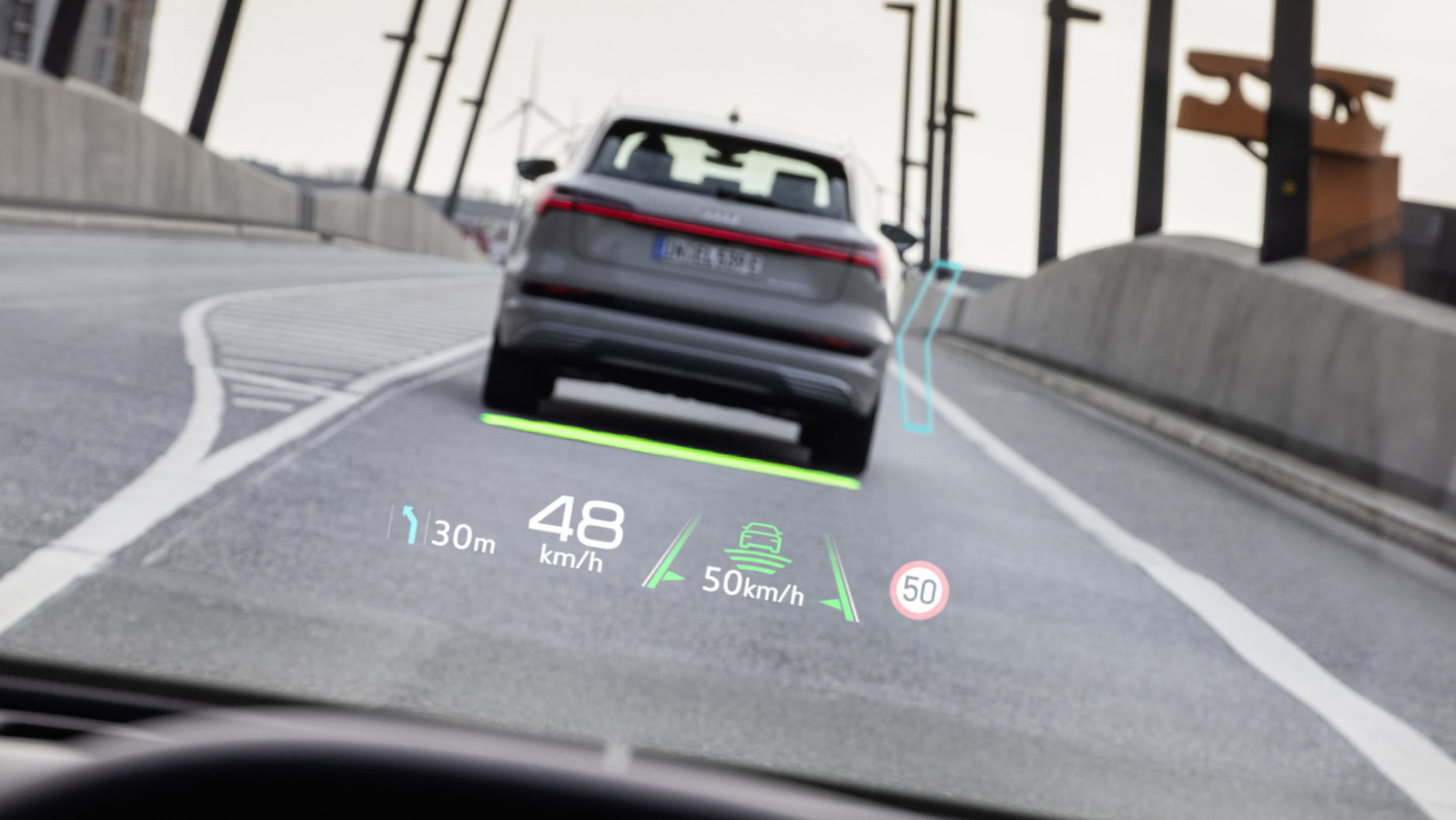
The answer to what is a car head up display also depends on the vehicle. A basic HUD may show only speed. A more advanced system can act as a connected information layer for driving.
Common information includes:
• Current vehicle speed
• Speed limits and traffic signs
• Turn-by-turn navigation arrows
• Lane guidance
• Forward collision warnings
• Lane departure warnings
• Adaptive cruise control status
• Following distance alerts
• Incoming call information
• Audio controls
• Hybrid or electric vehicle data
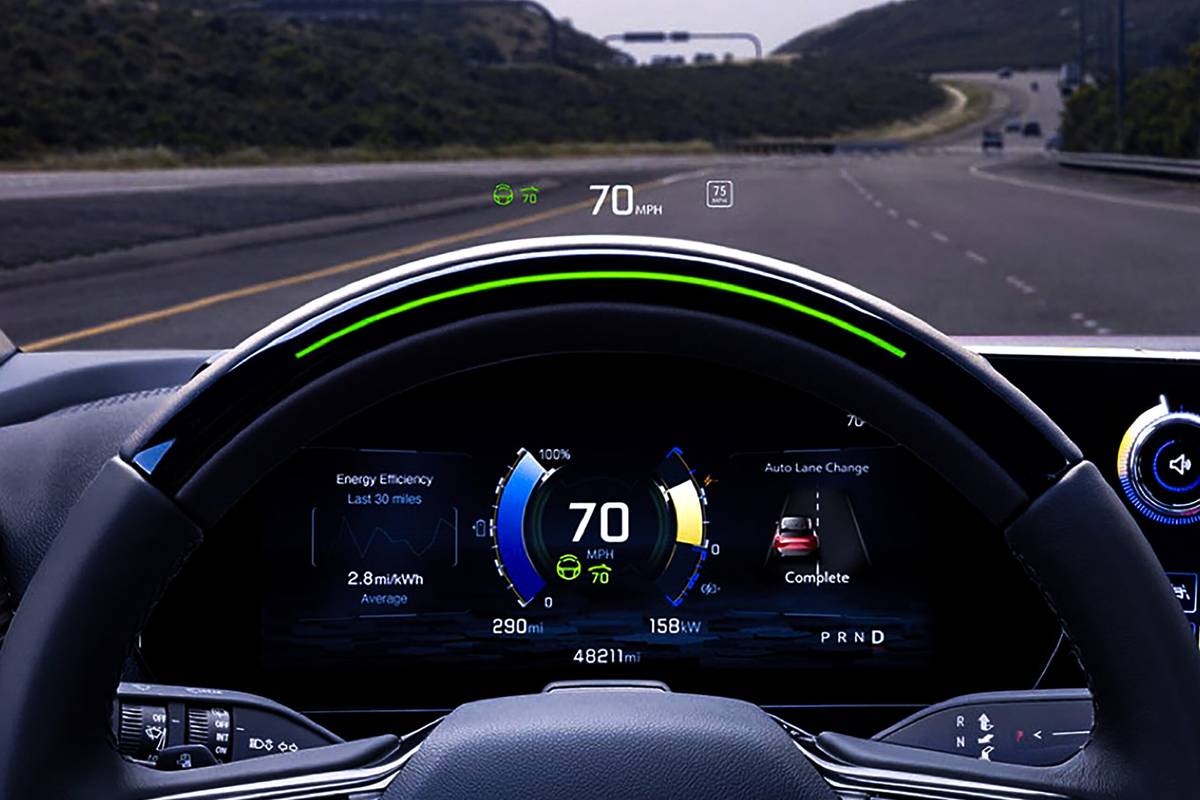
A simple display may show white numbers and arrows. A more advanced augmented reality HUD may place navigation arrows over the road ahead. For example, an arrow could appear to point toward the exact lane for an upcoming turn.
However, the image is still a visual overlay. It does not mark the road with a physical object. Drivers must continue to check mirrors, signs, blind spots, and the full traffic scene.
Basic HUD versus augmented reality HUD
There are two main types of factory systems:
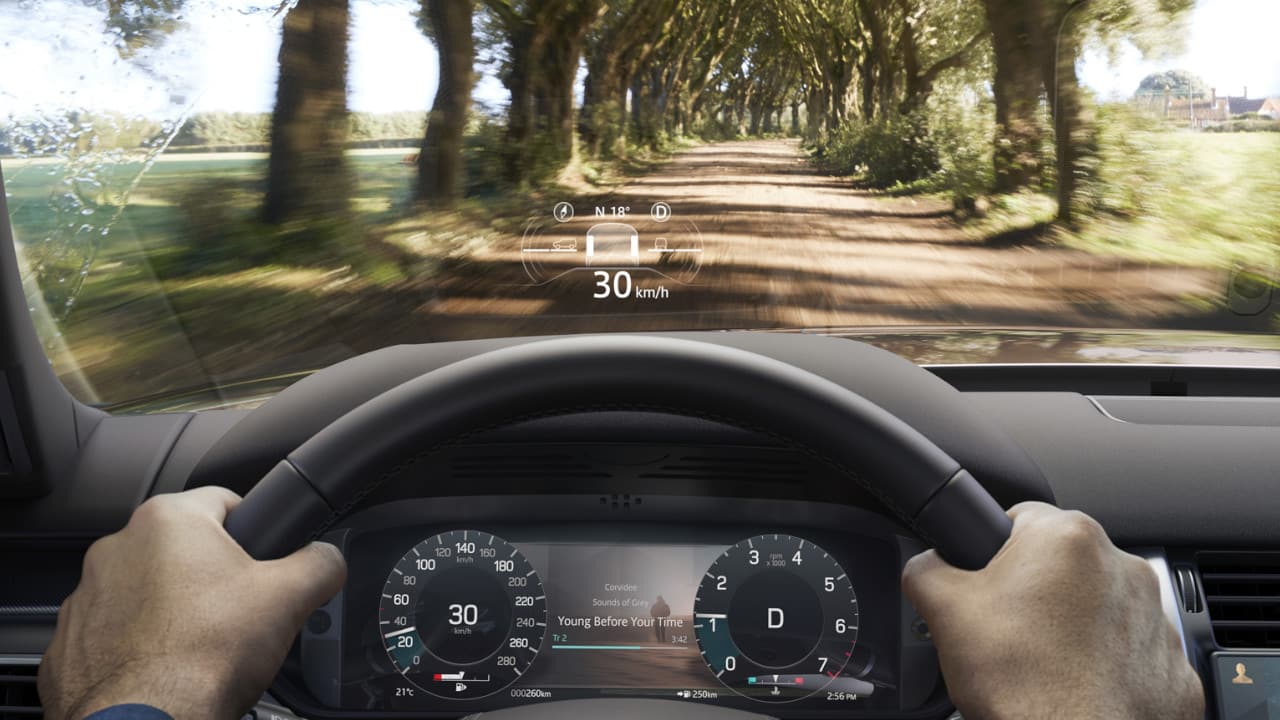
• Standard HUD: Shows information in a fixed area near the bottom of the windshield.
• Augmented reality HUD: Places some information farther into the driver’s view and may align it with lanes, turns, or nearby vehicles.
An augmented reality display can feel more natural, but it needs more precise calibration. Its performance may also depend on camera data, GPS accuracy, road markings, and weather.

Main Types of Car Head-Up Displays
When people ask what is a car head up display, they may be referring to different products. HUD technology comes in factory-installed, aftermarket, and smartphone-based forms.
Factory-installed windshield HUD
A factory HUD is built into the vehicle. It usually offers the best fit, image quality, and integration with vehicle systems.
Advantages include:
• Clean dashboard design
• Automatic brightness control
• Access to navigation and safety data
• Better calibration
• Fewer loose wires
• Strong integration with the vehicle’s controls
The main drawback is cost. Factory HUDs are often available only on higher trim levels or as part of an expensive technology package.
Aftermarket dashboard HUD
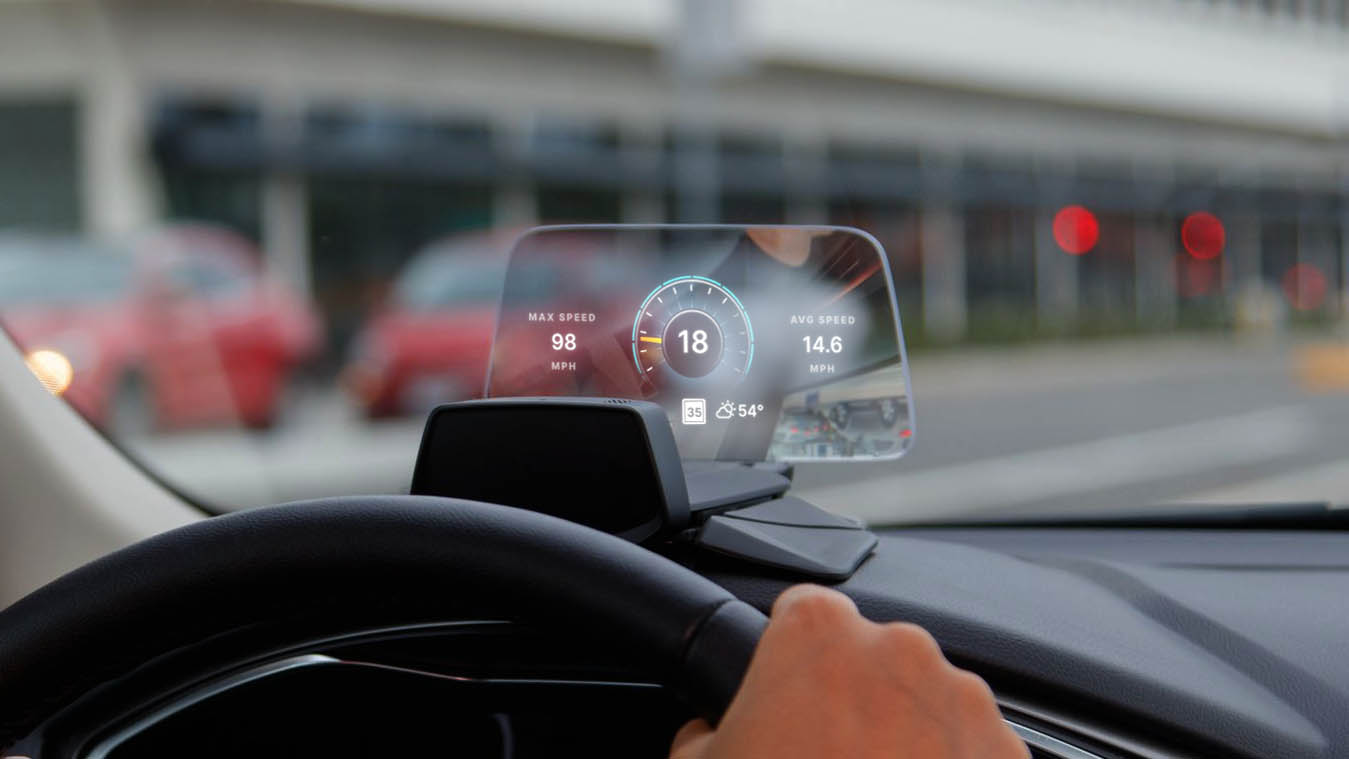
An aftermarket HUD is a small device that sits on the dashboard. It may connect to the vehicle through the OBD-II port, a USB cable, or a GPS signal.
These units can show speed, engine data, trip information, and warning codes. Some models project onto a clear film placed on the windshield. Others use a small pop-up screen.
An aftermarket device can be useful for an older vehicle. Still, image quality varies widely. Some units are hard to read in sunlight, while others create glare at night.
Smartphone-based HUD
Some navigation apps can mirror basic information onto a reflective windshield film. In many cases, the phone is placed on the dashboard with its screen facing upward.
This option is inexpensive, but it has limits. The phone may overheat, the image may be dim, and the setup may not integrate with vehicle safety systems. It is also important to secure the phone and avoid adjusting it while driving.
Benefits of Using a Car Head-Up display
the most important answer to what is a car head up display involves its purpose. A HUD is designed to reduce visual distraction by placing selected information closer to the driver’s forward view.
Less time looking down
Looking down at a dashboard takes your eyes away from the road. Even a short glance can matter in busy traffic. A HUD lets you check speed or navigation with less movement.
It does not remove distraction completely. You still need to process the information. However, keeping your head upright and your eyes near the road can make information checks more natural.
Easier navigation
A navigation arrow in front of you can be easier to follow than a map on the center screen. This is especially helpful at complex intersections, roundabouts, and multi-lane exits.
The best systems show only the next important action. They do not force you to study a large map while driving.
Better awareness of speed
A visible speed reading can help drivers maintain a legal and steady speed. This is useful in areas where speed limits change often, such as school zones and construction areas.
Some systems also display the detected speed limit. Drivers should treat this as support, not as a replacement for reading road signs. Camera systems can misread signs, and map data can become outdated.
Helpful safety alerts
A HUD may show warnings from forward collision systems, lane assistance, or blind-spot monitoring. These alerts can draw attention to a possible risk.
They should never encourage overconfidence. Driver assistance systems have limits, and no HUD can see every hazard in every condition.
A cleaner driving experience
A well-designed HUD can reduce the need to switch attention among the instrument panel, center display, and phone. After a short adjustment period, many drivers find the system easy to use.
In my practical testing of dashboard displays, the most useful HUDs were not the ones with the most data. They were the ones that showed only the information needed at that moment.
Limitations and Safety Concerns
A clear answer to what is a car head up display must also include its weaknesses. HUDs can support attention, but they are not a safety guarantee.
Too much information
A crowded display can become another source of distraction. Bright icons, messages, navigation arrows, and entertainment details may compete for attention.
Look for systems that let you hide information. A useful setup may show speed and navigation, while leaving calls and music controls on the main screen.
Glare and poor visibility
Sunlight can wash out a weak display. Dirt, scratches, polarized sunglasses, and certain windshield treatments may also affect visibility.
At night, excessive brightness can be uncomfortable. Adjust the display before driving, not while moving.
Double images and ghosting
Some HUDs can show a faint second image. This may happen because of windshield design, incorrect replacement glass, or poor alignment.
If a factory HUD suddenly looks doubled after windshield replacement, check whether the glass is approved for that vehicle. A standard windshield may not support the same optical performance.
Driver dependence
A HUD can make drivers feel more confident than they should. It is still necessary to scan the road, check mirrors, watch pedestrians, and respond to changing conditions.
A display may show a speed limit, but it may not know about a temporary construction sign. It may show a navigation route, but it cannot understand every human action around you.
Cost and repair concerns
Factory HUD components can be expensive to repair. A damaged projector, windshield, or control unit may require specialized service.
Before buying a vehicle with a HUD, ask about windshield replacement costs and calibration requirements. This small check can prevent an unpleasant repair bill later.
How to Use a Car Head-Up Display Safely
Knowing what is a car head up display is only the first step. The way you set up and use it matters just as much as the technology itself.
Follow these practical steps:
- Adjust the height so the image sits below your main view of the road.
- Set brightness high enough for daylight but low enough for night driving.
- Keep the display limited to useful information.
- Confirm that navigation arrows match the road layout.
- Continue checking mirrors and blind spots.
- Do not operate settings while the vehicle is moving.
- Clean the windshield and projection area regularly.
- Read the owner’s manual to understand warning symbols.
- Avoid placing stickers or dark films over the projection area.
- Recalibrate the system after certain windshield repairs if required.
One common mistake is setting the HUD too high. The display should support your view, not cover the road. Another mistake is turning on every available feature at once. More data does not always mean more awareness.
When I compare HUD layouts, I focus on three questions: Can I read it quickly? Does it show only useful data? Does it stay clear in both sun and darkness? These questions are more valuable than judging a system by its number of features.
How to Choose an Aftermarket HUD
If your vehicle does not have a built-in system, an aftermarket unit may be worth considering. The best choice depends on your vehicle, budget, and desired information.
Look for these features:
• Brightness adjustment: The display should remain readable in daylight and comfortable at night.
• Automatic dimming: This helps reduce glare after sunset.
• GPS or OBD-II connection: GPS models are easy to move between vehicles, while OBD-II models can access more vehicle data.
• Speed accuracy: Compare readings with your vehicle’s speedometer and a trusted GPS source.
• Over-speed alerts: These can support speed awareness without requiring constant checking.
• Stable mounting: The device should not move during hard braking or sharp turns.
• Clear instructions: Setup should not require complex wiring or unsafe placement.
• Vehicle compatibility: Confirm that the product works with your car before buying.
GPS-based units can work in many vehicles, but they may take time to find a signal. OBD-II units may show more data, but some vehicles use the port for other equipment.
Avoid placing an aftermarket display where it blocks the road, airbags, vents, or important controls. A low-cost device is not a good deal if it creates glare or encourages frequent interaction.
Car Head-Up Display Compared With a Digital Instrument Cluster
A digital instrument cluster replaces traditional gauges behind the steering wheel. A HUD adds information to the driver’s forward view.
The two systems serve different purposes:
• Digital instrument cluster: Offers detailed vehicle information and customizable gauges.
• Head-up display: Offers quick information with minimal eye movement.
• Center touchscreen: Handles maps, media, settings, and many vehicle controls.
A HUD does not make the other screens unnecessary. It works best as a fast glance tool. Detailed tasks should remain on the center display when the vehicle is stopped or when it is safe to use them.
This distinction helps explain what is a car head up display. It is not simply a second instrument cluster. It is an optical interface designed to reduce the distance between the road and key driving information.
 display”
style=”max-width: 100%; height: auto; border: 2px solid black; border-radius: 10px; display: block; margin: 0 auto;”
loading=”lazy”
/>
Are Head-Up Displays Worth It?
Whether a HUD is worth the cost depends on how you drive. It may be especially useful for people who travel on unfamiliar roads, drive in heavy traffic, or want quick access to speed and navigation data.
A HUD may be less valuable if you rarely use navigation or prefer traditional gauges. Some drivers also need time to adjust to information appearing in front of them.
Consider these questions before paying extra:
• Do you often look down to check speed?
• Do you use navigation on most trips?
• Is the display bright and clear in your usual weather?
• Can you adjust the information shown?
• What will windshield replacement cost?
• Does the system support your preferred navigation service?
• Can you test it before buying the vehicle?
A short test drive is important. Sit in your normal driving position and check the display in bright light, shade, and at night if possible.
In my view, a good HUD is most valuable when it feels almost invisible. You should notice the information, act on it, and return your attention to the road without thinking about the device.
Frequently Asked Questions About What Is a Car Head Up Display
Is a car head-up display safe?
A car head-up display can support safer information checks by reducing the need to look down. However, it does not replace attentive driving, mirror checks, road scanning, or careful judgment.
Can a car HUD show Google Maps or Apple Maps?
Some factory systems can display navigation directions from compatible phone platforms or built-in navigation systems. Compatibility varies by vehicle, software version, and smartphone connection.
Does a head-up display work in bright sunlight?
Most factory systems adjust brightness to remain visible in changing light. Aftermarket models vary, and some may become difficult to read in strong sun.
Can I add a HUD to an older car?
Yes, you can install an aftermarket HUD in many older vehicles. GPS models are usually easier to install, while OBD-II models may provide more vehicle data but require compatibility checks.
Does a HUD project directly onto the windshield?
Some systems project directly onto a specially designed windshield. Others use a transparent combiner screen or a small dashboard display.
Can polarized sunglasses block a head-up display?
Certain polarized lenses can make some HUD images look dim or disappear at particular angles. Test your sunglasses with the vehicle before relying on the display.
Does replacing the windshield affect the HUD?
It can. A replacement windshield that lacks the correct optical design may cause blur, double images, or poor brightness, so use approved glass and complete calibration when needed.
Conclusion
What is a car head up display? It is a driver information system that projects useful data into the driver’s forward view. It can show speed, navigation, traffic signs, and safety alerts while reducing the need to look down.
The best systems are clear, limited, and easy to adjust. They support your attention without replacing careful driving. Before choosing a factory or aftermarket unit, test its brightness, visibility, compatibility, and windshield requirements.
If you are shopping for a vehicle or considering an aftermarket upgrade, use this guide to compare your options carefully. Explore your vehicle’s manual, test the display in real conditions, and share your experience with other drivers.