
What Is A Wireless Car Charger: Complete Guide
A wireless car charger uses magnetic induction to charge a compatible phone without a cable while you drive.
A wireless car charger combines a phone mount with a wireless charging pad or magnetic ring. It can make daily driving easier by reducing cable clutter, but charging speed, phone alignment, heat, and case design all affect how well it works. This guide explains what a wireless car charger is, how it works, what to look for, and how to use one safely.
What Is a Wireless Car Charger?
A wireless car charger is a device that holds your phone and sends electrical power to it without a charging cable plugged into the phone. It usually connects to your vehicle’s 12-volt outlet, USB port, or a built-in power outlet.
Most models have two main parts:
- A mounting system that attaches to the dashboard, windshield, air vent, or cup holder
- A charging surface that transfers power to a compatible smartphone
A wireless car charger uses the Qi wireless charging standard in many cases. Qi is an industry standard that allows compatible phones and charging devices to work together through magnetic induction.
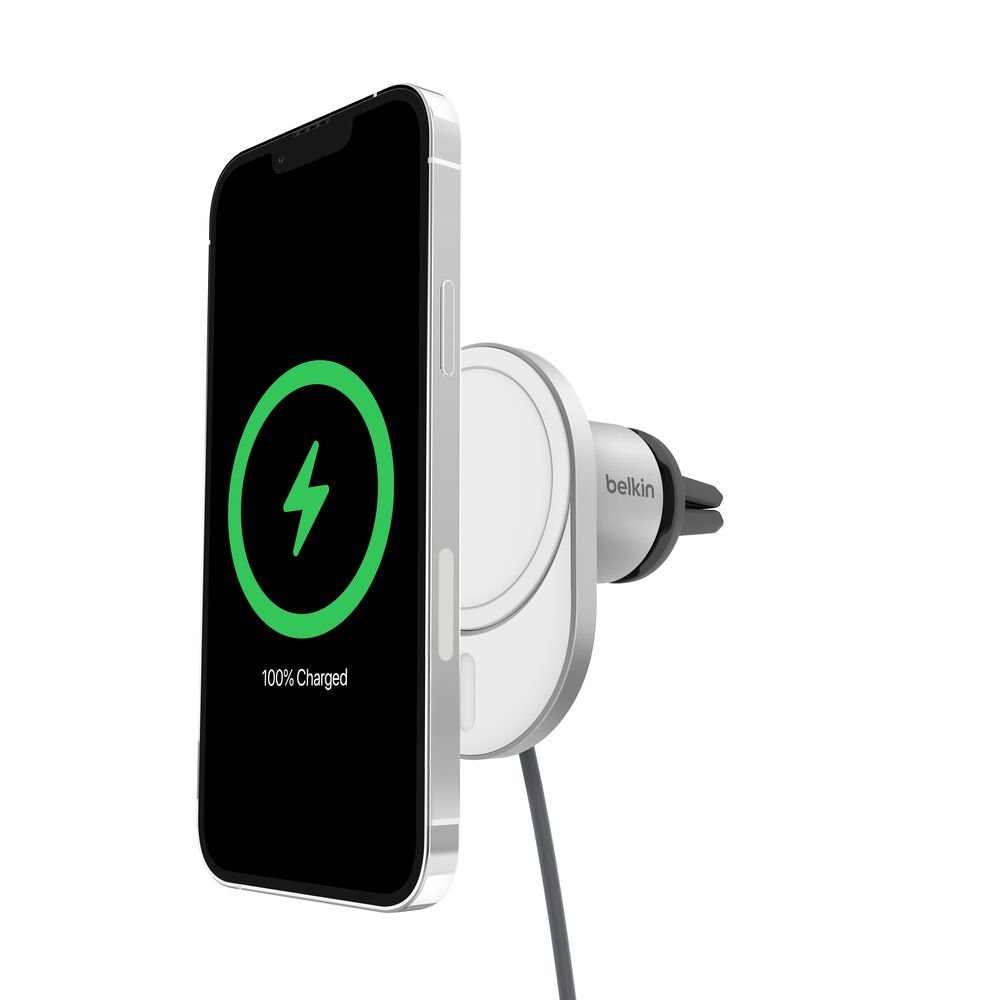
Some newer models use magnetic attachment systems. These chargers can hold phones with built-in magnetic rings, such as many MagSafe-compatible iPhones. However, magnetic attachment and wireless charging are related but not identical. A phone may attach magnetically but still need a compatible charging coil for power to flow.
In simple terms, a wireless car charger is like a small charging station built into a phone mount. You place your phone on it, and the charger sends power across a very short gap.

How Does a Wireless Car Charger Work?
A wireless car charger transfers energy through electromagnetic fields. The charger contains a copper coil called the transmitter coil. Your phone contains a matching receiver coil near the back of the device.
When the phone sits in the correct position, the charger sends an alternating current through its coil. This creates a changing magnetic field. The phone’s receiver coil picks up that energy and converts it into electrical power for the battery.
The process includes several safety checks. The charger and phone communicate to manage power, temperature, and charging status. If the phone moves out of alignment or becomes too hot, charging may slow or stop.
The basic charging process
- The car supplies power to the charger through a USB port or 12-volt adapter.
- The charger creates a magnetic field through its internal coil.
- The phone’s coil receives the energy.
- The phone converts that energy into usable battery power.
- The charger adjusts output based on the phone’s needs.
A wireless car charger does not charge through unlimited space. The phone must stay close to the charging coil. Thick cases, metal plates, cards, and poor alignment can block or weaken the connection.
Qi and Qi2 charging
Qi is the most common wireless charging standard. Qi2 is a newer standard that improves magnetic alignment and charging efficiency for supported devices and accessories.
Qi2 uses a magnetic profile that helps the phone sit in the correct position. Better alignment can reduce wasted energy and help maintain a more stable charge. Still, the actual speed depends on the phone, charger, power adapter, software, and temperature.

Types of Wireless Car Chargers
Wireless car chargers come in several designs. The best type depends on your phone, vehicle, driving habits, and preferred mounting position.
Dashboard and windshield mounts
These models use a suction cup or adhesive base. They offer a clear view and often provide flexible positioning.
A high-quality suction mount can work well, but heat and sunlight may weaken the suction over time. Avoid placing the charger where it blocks your view of the road, airbags, or important controls.
Air vent mounts
Air vent wireless car chargers attach to a vehicle’s vent slats. They are compact and easy to install.
The main drawback is airflow. A vent-mounted charger may block warm or cool air, and the phone may become hot if the vent blows warm air directly onto it. Heavy phones can also pull down weak vent slats.
Cup holder mounts
Cup holder models use a stable base and often include an adjustable arm. They can hold larger phones and avoid blocking the windshield.
The tradeoff is reach. Looking down toward a phone in a cup holder can be less convenient and may be less safe for navigation. Set up your route before driving and use voice controls whenever possible.
Magnetic wireless chargers
Magnetic chargers use built-in magnets or a magnetic phone ring. They make one-handed mounting fast and keep the phone centered over the charging coil.
A magnetic charger may not hold every phone securely. Check whether your phone supports magnetic alignment or needs a compatible magnetic case or ring.
Built-in vehicle chargers
Some vehicles include a wireless charging tray from the factory. These systems look clean and require no extra mount, but they may not hold the phone in place during sharp turns.
A built-in tray can also have alignment limits. Large phones, camera bumps, or thick cases may prevent proper contact with the charging area.

Benefits of Using a Wireless Car Charger
A wireless car charger can improve convenience, especially for drivers who use navigation, music, or hands-free calls.
Less cable clutter
You do not need to connect a cable each time you enter the car. This keeps the center console cleaner and reduces loose wires near the gear selector.
Easy phone placement
Most models let you place the phone into the mount with one hand. Magnetic designs can be especially quick because the phone guides itself into position.
Continuous power for navigation
Navigation apps can use significant battery power. A wireless car charger helps replace some of that energy while you drive, so your phone is less likely to run out during a trip.
Better organization
A mounted phone is easier to see than a device lying on a seat. It can also keep the phone within reach for voice commands and legal hands-free use.
Broad device support
Many Qi chargers work with a range of Android phones and iPhones. However, compatibility does not always mean the same charging speed. Always check the specifications for your exact phone model.

Limitations and Common Problems
A wireless car charger is convenient, but it is not perfect. Understanding its limits can prevent frustration.
Heat buildup
Wireless charging can create more heat than wired charging because some energy is lost during transfer. Direct sunlight, a warm dashboard, a phone case, and navigation use can increase temperature.
Modern phones reduce or stop charging when they get too hot. This protects the battery, but it can make charging slow or intermittent.
Slower charging
Some wireless car chargers provide less power than a fast wired charger. A phone running navigation, streaming music, and mobile data may use power almost as quickly as the charger supplies it.
Look for the charger’s rated output, but remember that the phone controls the final charging speed.
Misalignment
The charging coils must line up closely. A phone that sits too high, too low, or at an angle may charge slowly or not charge at all.
This is one reason magnetic Qi2 designs can be helpful. They guide the phone toward the correct position.
Thick or unsuitable cases
A thick case may create too much distance between the phone and charger. Metal plates, wallets, pop sockets, and credit cards can also interfere with charging.
Remove accessories that sit between the phone and charging pad. Never place bank cards or access cards on a wireless charging surface for long periods.
Weak vehicle power
Older cars may have USB ports that provide limited power. A charger can only deliver as much power as its source allows.
If the charger includes a 12-volt adapter, use a reliable adapter with enough output for the charger. A cheap adapter may cause slow charging, repeated disconnects, or excess heat.

Is Wireless Charging Safe for Your Phone?
Wireless charging is generally safe when the charger follows recognized standards and includes proper protection. Certified products typically manage temperature, power levels, foreign objects, and overcharging.
Phone batteries naturally lose capacity over time. Heat is one of the factors that can speed up battery wear. For that reason, a wireless car charger should not be placed in direct sun or near a hot air vent when avoidable.
A safe setup should include:
- Overheat protection
- Overvoltage protection
- Short circuit protection
- Foreign object detection
- A reputable Qi or Qi2 certification
- A stable mount that does not fall during normal driving
Wireless charging does not usually overcharge a modern phone. The phone controls the battery and reduces power when it reaches a high charge level. Even so, constant heat can affect long-term battery health.
The best approach is simple: keep the phone cool, use a quality charger, and do not cover the phone with clothing or other items while it charges.

How to Choose the Best Wireless Car Charger
Choosing a wireless car charger involves more than checking the advertised wattage. Consider how the charger will fit your phone and vehicle.
Check phone compatibility
Confirm that your phone supports Qi, Qi2, or the magnetic system used by the charger. If you use a case, check the case thickness and whether it supports magnetic charging.
Consider the charging speed
A charger may advertise 10-watt, 15-watt, or higher output. Your phone may accept less than that amount.
Read the phone manufacturer’s specifications and choose a charger that supports the correct standard. A higher number does not always mean faster real-world charging.
Choose a secure mount
The mount should stay in place on rough roads and during sudden stops. Test the adjustment arms and locking mechanism before relying on it for navigation.
Check the power supply
Some chargers include a 12-volt adapter. Others require your own USB adapter.
For faster charging, the power adapter must provide enough power. A basic vehicle USB port may not support the charger’s full rating.
Look for useful features
Helpful features may include:
- Automatic clamping arms
- Magnetic alignment
- One-hand operation
- Adjustable viewing angles
- A ball joint for positioning
- Night-friendly indicator lights
- A detachable USB cable
- Overheat and foreign object protection
Avoid misleading claims
Terms such as “fast charging” can vary between brands. Check whether the claimed speed applies to your phone model and whether it requires a specific adapter.
In hands-on testing, one common mistake is buying a powerful charging pad but using an old, low-power car adapter. The charger may be capable, but the complete system is only as strong as its weakest part.
How to Install and Use a Wireless Car Charger
A good installation keeps the phone visible, stable, and outside the path of airbags.
- Choose a safe mounting location.
- Keep the charger away from the windshield’s main viewing area.
- Avoid airbag panels and steering wheel controls.
- Connect the charger to a suitable USB port or 12-volt adapter.
- Place the phone so its charging coil matches the charger’s coil.
- Confirm that the charging symbol appears.
- Adjust the angle before starting your trip.
- Test the mount on a short drive.
Do not adjust the charger while moving. Set up navigation before you leave, and use voice commands when possible.
If charging starts and stops, remove the phone case and check alignment. Then inspect the cable, power adapter, and charging port. If the phone becomes hot, move it out of direct sunlight and stop charging until it cools.
Clean the contact surfaces from time to time. Dust or residue may not block wireless power completely, but it can affect grip and cause the phone to slide out of position.
Wireless Car Charger vs. Wired Car Charger
A wired car charger usually provides more consistent power and can charge many phones faster. It also works with phones that do not support wireless charging.
A wireless car charger is easier to use because it removes the need to connect a cable. It can be the better choice for short trips, frequent navigation, and drivers who want a clean dashboard.
Choose wired charging when:
- You need the fastest possible charging
- Your phone does not support wireless charging
- You use a thick or metal case
- You need reliable power during a long trip
- Your car already has a convenient USB-C port
Choose wireless charging when:
- You want quick phone placement
- You use a compatible phone case
- You prefer fewer cables
- Your daily trips are short or moderate
- Your mount location supports safe viewing
Many drivers keep both options available. Wireless charging handles everyday use, while a USB-C cable provides a backup for long journeys or low-battery emergencies.
Common Mistakes to Avoid
Small mistakes can reduce performance or damage your accessories.
- Using a charger with no clear safety rating
- Placing a metal plate between the phone and charger
- Covering the phone while it charges
- Mounting the device over an airbag panel
- Blocking the driver’s view
- Using a weak or damaged power adapter
- Expecting maximum speed from every phone
- Leaving the phone in direct summer sunlight
- Using a loose vent mount with a heavy phone
- Ignoring repeated heat warnings
One practical lesson is to judge the whole setup, not only the charging pad. The phone, case, mount, cable, vehicle port, and adapter all affect results.
Frequently Asked Questions
What is a wireless car charger used for?
A wireless car charger powers a compatible phone while holding it in a convenient position inside a vehicle. It is commonly used for navigation, music, calls, and keeping the battery charged during trips.
Does a wireless car charger work with every phone?
No. The phone must support Qi, Qi2, or a compatible magnetic charging system. Some phones also need a special case or magnetic ring for secure attachment.
Can a wireless car charger damage a phone battery?
A certified charger should not damage a phone when used correctly. Excessive heat may contribute to battery wear, so keep the phone out of direct sun and stop charging if it becomes unusually hot.
Why does my wireless car charger keep stopping?
Common causes include poor alignment, a thick case, a weak power adapter, overheating, or an incompatible accessory. Remove the case, center the phone, check the power source, and allow the phone to cool.
Is wireless charging faster than wired charging?
Usually, wired charging is more consistent and may be faster, especially with USB-C Power Delivery. Wireless charging can still provide enough power for normal navigation and everyday driving.
Can I use a magnetic wireless car charger without a magnetic case?
It depends on the phone and charger. Some magnetic chargers need a built-in magnetic ring or compatible case to hold the phone securely and align the charging coils.
Conclusion
A wireless car charger is a phone mount that transfers power through electromagnetic induction instead of a charging cable. It offers simple placement, less clutter, and convenient power for navigation, but its performance depends on alignment, heat, phone compatibility, case design, and the vehicle’s power source.
Choose a certified model with a secure mount and suitable charging output. Install it where it does not block your view or interfere with airbags, then test it before using it on a long trip. Compare reliable wireless car charger options, check your phone’s specifications, and choose the setup that fits your daily driving needs.





One Comment